📁 My Projects
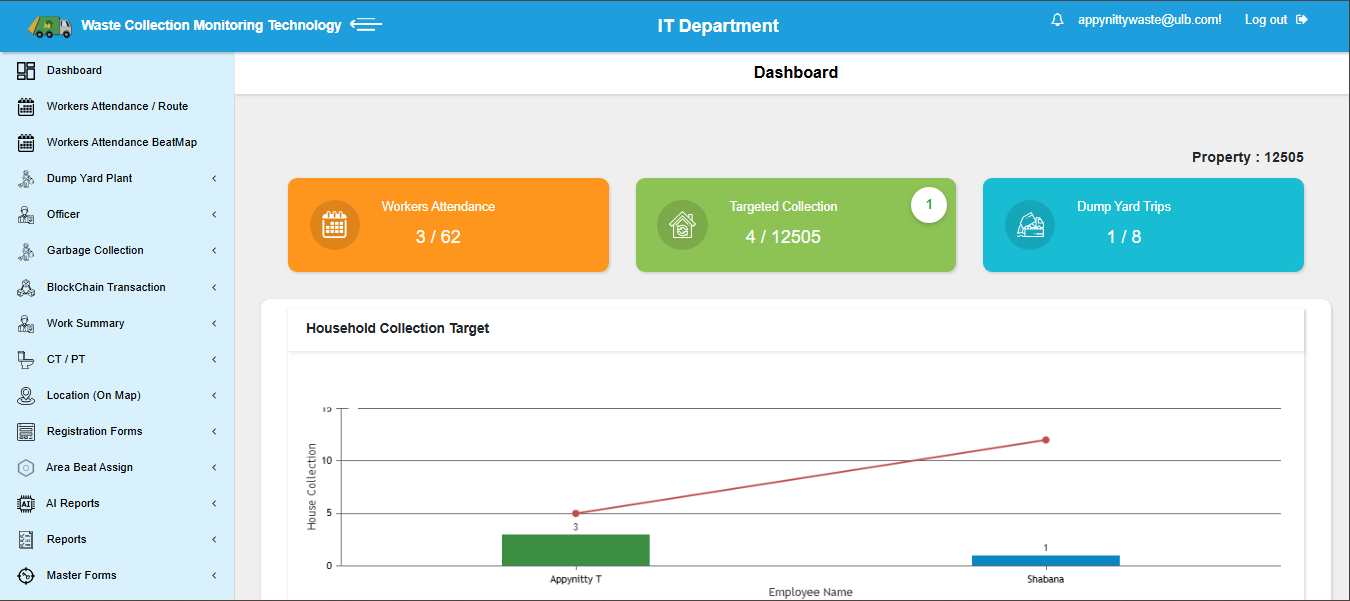
ICTSBM CMS – Smart Waste Monitoring
A full-scale municipal waste & workforce monitoring system with real-time tracking and analytics.
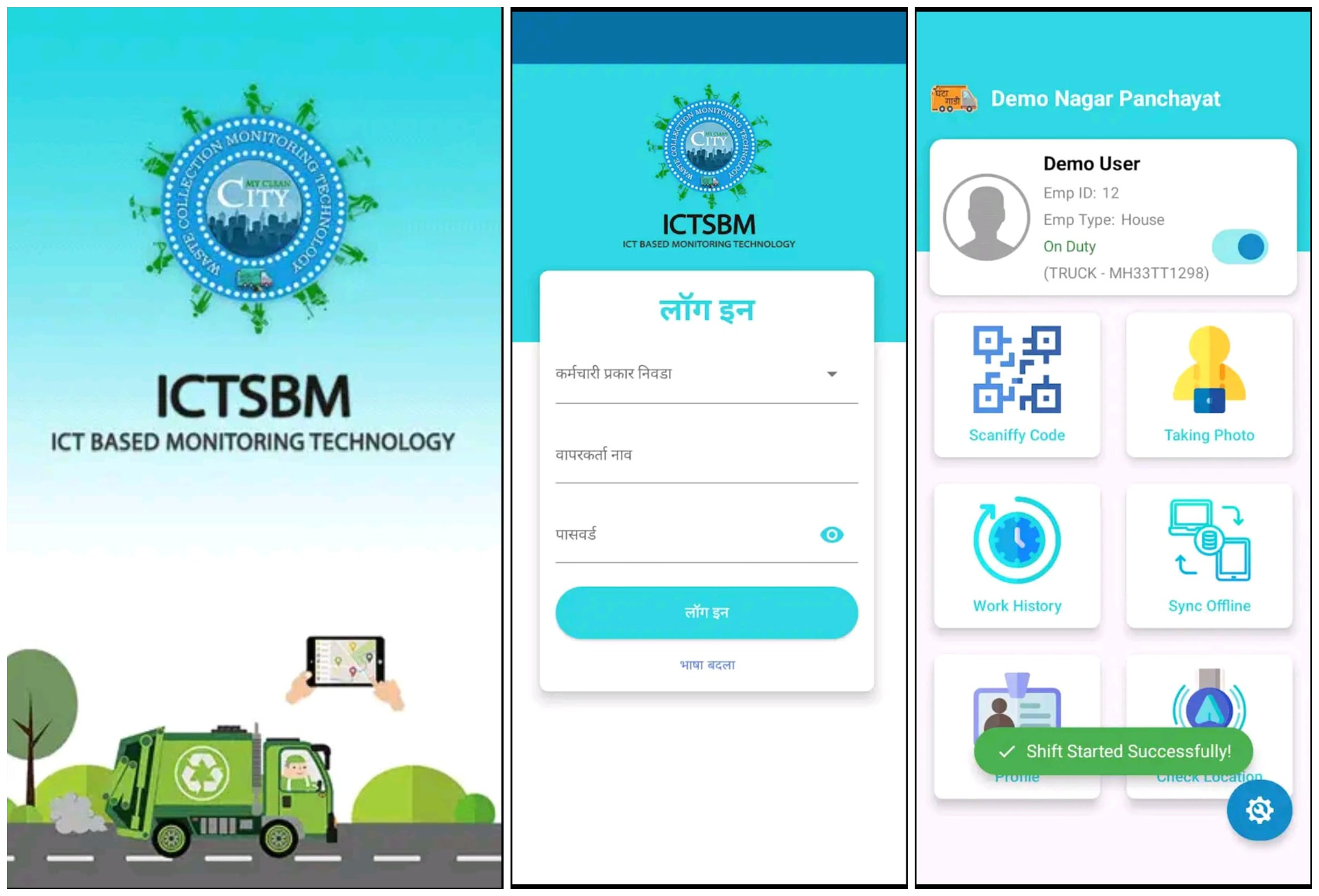
ICTSBM Backend – ASP.NET Web API
Designed and developed secure, scalable Web APIs powering the ICTSBM Android application with real-time tracking, QR workflows, and automation.
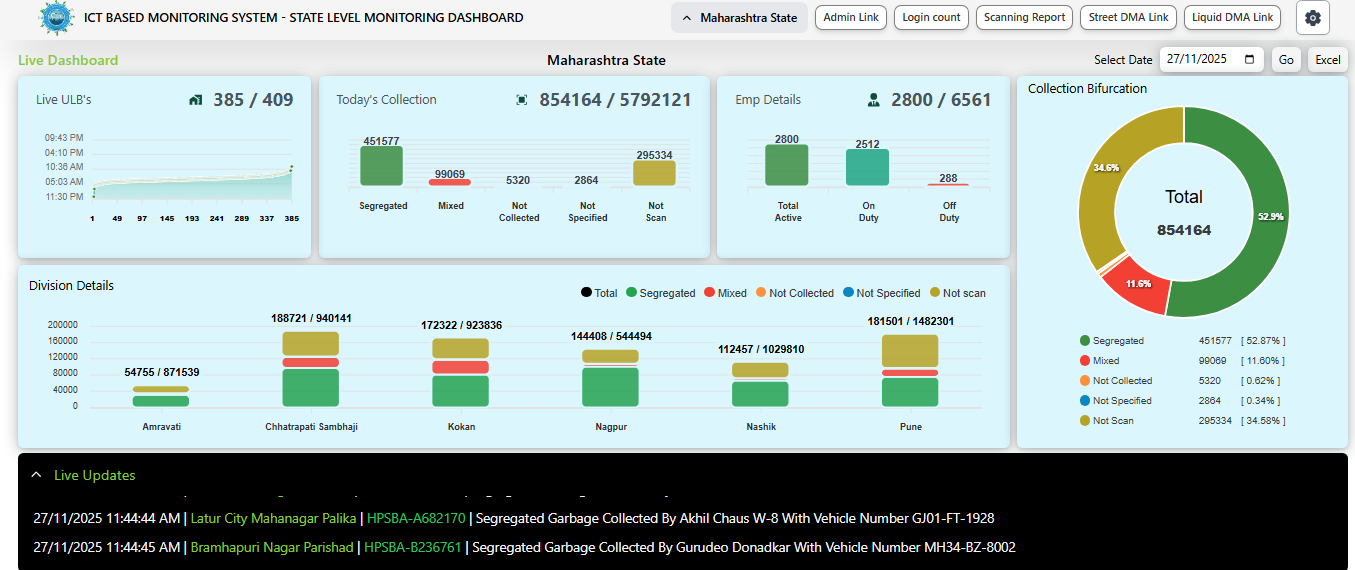
DMA Dashboard – State/District Monitoring Portal
Developed multi-level government dashboard with hierarchical access, scanning analytics, live notifications, and drill-down reporting for ULB operations.

HouseScanify Super Admin Portal
Centralized Super Admin system for monitoring ULB activity, tracking employee work, and viewing live house scanning updates.
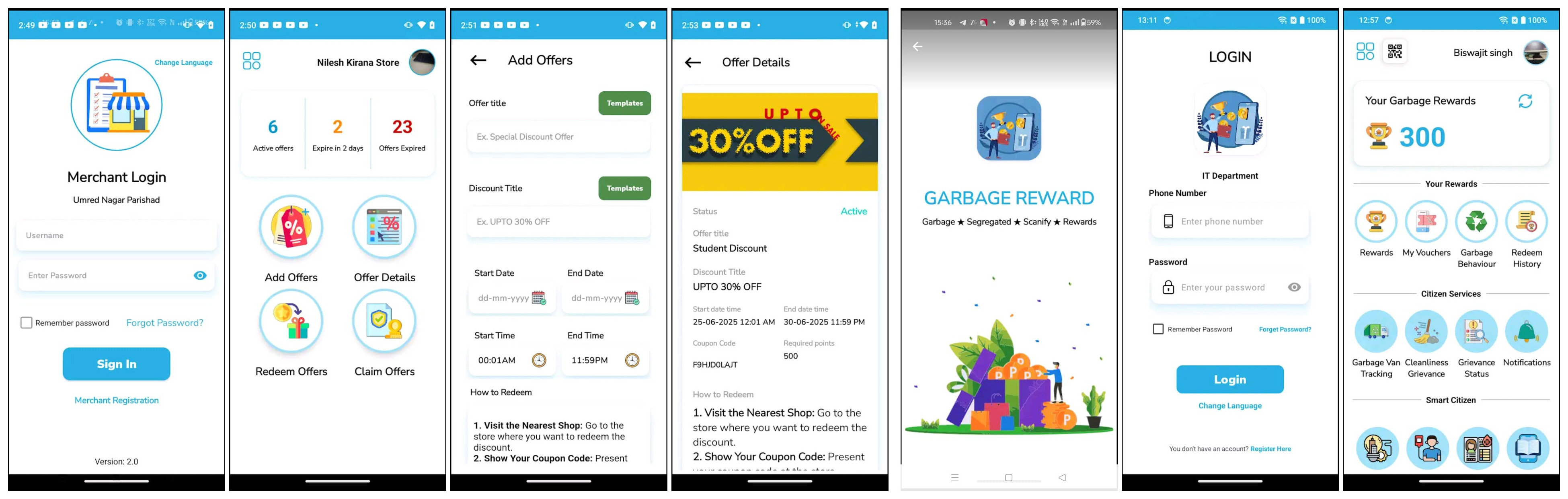
Citizen Reward & Merchant Platform
Digital reward system for citizens with merchant integration, coupon redemption, garbage behaviour points, and reward-based engagement services.
ICTSBM CMS – Smart Municipal Waste & Workforce Monitoring System
ICTSBM CMS is a comprehensive municipal monitoring system built for Waste Collection, Street Sweeping, and Liquid Waste departments across various ULBs. The platform provides real-time employee tracking, daily operations monitoring, automated reporting, and AI-based analytics.
Role: Senior .NET Developer
Tech Stack: ASP.NET MVC/Core, C#, SQL Server, Maps API, SSRS, Power BI, Python
1. Login & Access Workflow
- Waste Collection Monitoring
- Street Sweeping Monitoring
- Liquid Waste Monitoring
2. Dashboard Features
- Working vs Total Employees
- Garbage Collection Statistics
- Dump Yard Trips
- Attendance Summary
- Live Google Maps Tracking
3. Sidebar Modules
- Worker Attendance
- Garbage Collection Reports
- Registration Reports
- AI Reports (Prediction, Anomaly, Heatmap)
- Reset Password
4. Geofencing System
- Polygon boundary creation
- Employee → Geofence mapping
- GPS validation inside/outside zone
- Auto Not-Scan detection
Responsibilities
- Backend Architecture
- REST APIs & Dashboard Development
- Google Maps Integration
- AI + SSRS Reporting
- SQL Optimization
- Deployment & Documentation
ICTSBM Backend – ASP.NET Web API SOP
📘 Project Overview
Developed a complete ASP.NET Web API backend powering the ICTSBM Android mobile application. This API system handles real-time tracking, QR-based attendance, geofence validation, waste collection workflows, and automated reporting across multiple ULBs.
🎯 Purpose
To standardize Web API development with consistent, secure, and scalable backend architecture supporting municipal field operations.
📌 Scope
- Project setup & architecture
- API coding standards
- Authentication & authorization (JWT)
- Error handling & logging (Serilog)
- Database interaction (EF & SP execution)
- Testing & deployment
- Module-wise system models
🧩 Responsibilities
- Developed reusable and scalable API architecture
- Implemented JWT security with role-based authorization
- Integrated EF database-first models for multiple modules
- Built API endpoints for QR tagging, attendance, tracking, and checking
- Created stored-procedure-driven operations for high performance
- Added Swagger for automatic API documentation
- Implemented global error handling & request logging
- Configured deployment and environment management
⚙ Step-by-Step API Development Workflow
1️⃣ Project Setup
- ASP.NET Core Web API (.NET 6)
- Database-First EF integration
- Added Swagger, Serilog, AutoMapper
2️⃣ API Structure
- Controllers (Modular per domain)
- Service Layer (Business logic)
- Repository Layer (Database operations)
- Middleware for exceptions & token validation
3️⃣ Authentication
- JWT auth for secure API access
- Role-based endpoint protection
4️⃣ Logging & Error Handling
- Serilog structured logging
- Global exception middleware
5️⃣ Database Interaction
- EF Core for ORM
- Stored Procedures for heavy operations
- Parameterized queries
6️⃣ Testing & Deployment
- Swagger testing
- Postman automated tests
- CI/CD deployment to IIS
📦 Models Implemented
- House/Liquid/Street/DumpYard Registration
- QR Tagging – Employee Registration
- QR Tagging – Attendance
- QR Tagging – Tracking
- Checking & Verification Models
- Daily Data Entry Models
- Employee Registration / Attendance / Tracking
🏁 Outcome
A fully standardized API system that supports 100,000+ daily operations across multiple ULBs with reliable real-time tracking, accurate reporting, and scalable backend workflows.
SOP – DMA Dashboard (State/District/Division Portal)
1. User Hierarchy & Login
- State-Level User – Can view all ULBs with full filtering (Division → District → ULB).
- Division-Level User – Can view all districts & ULBs under that division.
- District-Level User – Can view all ULBs in their district.
- ULB-Level User – Limited to their own ULB data.
2. Dashboard Charts (Shown After Login)
- Chart 1 – ULB Work Start Time (First QR scan of the day)
-
Chart 2 – Scanning Performance
- Segregated
- Mixed
- Not Collected
- Not Specified
-
Chart 3 – Employee Status
- Active vs Total Employees
- On-Duty vs Off-Duty
-
Chart 4 – Area-wise Summary
- State → Division-wise
- Division → District-wise
- District → ULB-wise
-
Chart 5 – Live Notifications
- Employee Name
- Vehicle Info
- QR Scanned House/Shop ID
- ULB Name
- Date & Time
3. Login Count Tab
Displayed according to the login hierarchy.
- State User → Division, District, ULB login activity
- Division User → District & ULB login activity
- District User → Only ULB login activity
- ULB User → Only employee login activity
Table Format
Sr No. | Name | Login Count | Action
Clicking View Details shows child data with:
Sr No. | Name | Login Count | Last Login Time
4. Scanning Report Tab
Shows ULB-wise performance summary (table + charts).
Table Columns:
- Sr. No.
- ULB Name
- Working Days
- Scanning Frequency %
- Total Properties
- Scanning/Day (Target)
- Scanning/Day (Achieved)
Charts:
- Bar Chart – Scanning Frequency %
- Line Chart – Daily/Monthly Scanning Trend
- Pie Chart – Scanned vs Not Scanned
7. Reports & Export Features
- Export to Excel / PDF
- Date, Division, District, ULB level filters
- Full hierarchy drill-down (State → Division → District → ULB → Employee)
SOP – HouseScanifyemp Portal (Super Admin Workflow)
1. Login Process
- Super Admin logs in using central credentials.
- Authentication is validated from the Main Central Database.
- All ULB users, details, and connection strings are fetched from this database.
2. ULB Listing on Sidebar
After login, the left sidebar displays the complete ULB list divided into two groups:
A. LIVE ULBs (Work happening today)
- Green Blinking Dot – Employees working within last 10 minutes.
- Orange Dot – Work done today but inactive for last 10 minutes.
B. Remaining ULBs (No work today)
- ULBs with no activity for the day.
- ULBs yet to start operations.
3. Selecting a ULB
On selecting a ULB, the system loads the Summary Dashboard containing:
- Total House Count
- House Updated with Lat-Long (Total)
- House Updated with Lat-Long Today
- Liquid Waste Properties (Total & Today's updates)
- Street Waste Count (Total & Today)
- Dump Yard Count (Total & Today)
- Master Plate Count (Total & Today)
4. Employee Work Details Table
A consolidated table shows per-employee work progress:
- 👤 Employee Name
- 🏠 House Work Count (scanned/collected)
- 💧 Liquid Property Count
- 🛣️ Street Property Count
- 🗑️ Dump Yard Count
- 🏷️ Master Plate Count
This provides the complete daily performance overview of the team.
5. Tabs for Deep Dive Analysis
1. Day-Wise Count
Shows historical work records for:
- House updates
- Liquid waste
- Street waste
- Dump yard entries
- Master plate records
2. Team Attendance
- On-Duty
- Off-Duty
- Not Scanned
- Leave
3. Employee Details
- Employee profile & contact details
- Assigned vehicle & route
- Allocated working area
4. House Details
- Full house database for selected ULB
- Geo-tagging details (Latitude, Longitude)
- QR scanning history
SOP – Citizen Reward & Merchant Platform
1. User Wallet Registration
- Citizens register their mobile number and basic profile details.
- Wallet is created **against a valid HouseID within selected ULB**.
- House information validation is done through Central Database.
2. Login & Authentication
- Login using registered Mobile Number + Password.
- OTP-based optional verification for new devices.
- JWT authentication for secure API access.
3. Reward Point System
After login, citizen can view all accumulated reward points earned through good garbage disposal behaviour, such as:
- Providing segregated waste.
- Regular waste disposal on time.
- Participating in city cleanliness activities.
- Using official QR code for scanning.
The app displays:
- Total Reward Points
- Behaviour-Based Points
- Redeemable Points
- Reward History
4. Rewards, Vouchers & Redeem History
- System shows all rewards available for redemption.
- Citizen can redeem points in exchange for vouchers.
- Every redeemed voucher is added to the citizen’s redeem history.
5. Additional Services Offered
- Garbage Van Live Tracking
- Cleanliness Grievance Submission
- Grievance Status Notifications
- My City My Idea (Innovation Submission)
- Blood Donor Registration & Donor List
- Toilet Locator & Toilet Feedback
- City Info + “How to Reach City” Guide
6. ULB-based Offers from Merchants
- Each ULB has registered merchants.
- Merchants can upload offers for citizens (discounts, coupons, deals).
- Citizens view available offers based on their ULB.
7. Merchant Module – Functional Requirements
A. Merchant Registration
- Merchant registers with business details and ULB mapping.
- Admin verifies and activates merchant account.
B. Offer Creation
- Merchant uploads offers with description, discount %, expiry date.
- ULB admin approves the offer.
C. Coupon Redemption Flow
- Citizen redeems a reward → system generates a unique coupon code.
- Citizen visits merchant shop and shows the coupon.
- Merchant verifies coupon via Merchant API dashboard/mobile app.
- After successful verification → discount is given to user.
- Status changes from Redeemed → Claimed.
D. Merchant Features
- Dashboard for daily/weekly redeemed coupons
- Offer analytics (views, redemptions)
- Transaction history